

Definition[]
| “ | I'll find us a crew. There's bound to be some sailors on this rock crazy as you. | ” |
| “ | One can only hope. | ” |

A crew is a group of pirates that fight, plunder, or sail together. There is strength in numbers and working together, a crew can overcome larger, more numerous enemies, be able to protect and heal one another and share in larger rewards for their efforts and accomplishments.
Crews are fundamental to Pirates of the Caribbean Online, as the game rewards cooperation above all else.
Crewmates also can track each other on the compass. Fellow crewmen appear as pink dots. Crews also have a Chat Space that only those in the crew can see.
Crew Bonus[]
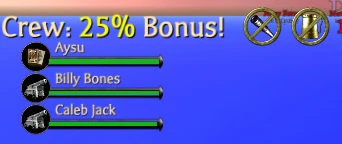

Being in a crew increases a pirate's reputation points they earn. The more pirates in a crew, the higher the bonus. Crew bonus only applies to pirates who are in the same area.
- Two Pirates - +20%
- Three Pirates - +25%
- Four Pirates - +30%
- Five Pirates - +35%
- Six Pirates - +40%
- Seven Pirates - +45%
- Eight to twelve pirates - +50%
Starting A Crew[]
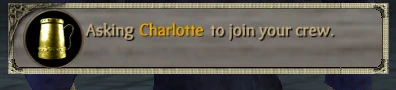
To create a crew, simply click on another pirate, or their name in your friend list. Then, chose the option Crew or the Mug icon on their profile card.
If the pirate is already in another crew, you will not be able to add them until they drop out of it.
Once a crew is started only the Captain, the pirate who started the crew, has the ability to add new mates.
In SvS or PvP, a pirate can choose the Start a Crew option to randomly add pirates looking for crew to join.
For pirates searching for a crew to join or members for their own, there is a Looking for Crew option, which will appear above the pirate's head. You can also activate this by typing in /lfc in the chat box.
New Arrivals[]
In The Legend of Pirates Online, when a new pirate arrives aboard ship who is NOT already in a crew, the captain will receive a POP-UP message.
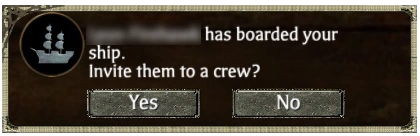
The message tells them who just boarded and asks if they are to be invited into the ship's crew. A quick YES / NO will decide. This message will disappear after about 30 seconds.
Crew Chat[]
When part of a crew, you can communicate with your crewmates directly. In Chat Box, in the lower-left, click on the Crew tab. Now, any text entered will appear in Light Green and only other crewmates can view it.
Crew Member Activity Icons[]
Shows what activity your Crew Member is doing. This gives more information about your crew mates and helps coordinate group play.
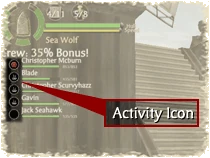
| |
| Icon | Status |
 |
Your Crew Member is aboard a Ship. |

|
Your Crew Member is using a Ship Wheel. |

|
Your Crew Member is using a Ship Cannon. |

|
Your Crew Member is using a Cutlass Weapon. |

|
Your Crew Member is using a Pistol Weapon. |

|
Your Crew Member is using a Voodoo Doll Weapon. |

|
Your Crew Member is using a Dagger Weapon. |

|
Your Crew Member is using a Grenade Weapon. |

|
Your Crew Member is using a Staff Weapon. |

|
Your Crew Member is playing Parlor Games. |

|
Your Crew Member needs to be revived. |
Crew Member Options[]
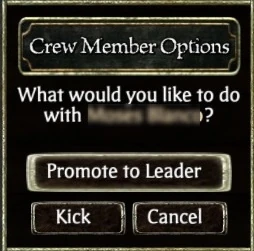

The pirate who originally started the crew is consider the Captain. The Captain is the pirate who can add other members to the existing crew or remove pirates who leave or cause trouble.
Just click on the Pirate's name in the Crew list then click the Crew icon.
Booting A Crewman[]
The pirate who started the crew can remove a member at anytime, if they are causing trouble aboard, have gone AFK, or the pirate was disconnected and hasn't returned.
Just click Kick from the Options.
Promoting a New Captain[]
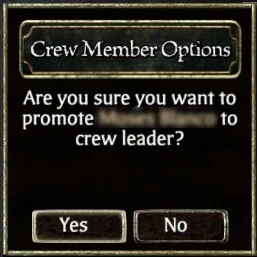

In The Legend of Pirates Online, the Captain can also choose to promote another crew member to be Captain in their stead.
Click on the Pirate to Promote, then click the Crew Icon (Mug).
In Crew Member Options, select Promote To Leader.
Click YES. That pirate now becomes Captain.



Rejoining A Crew[]
For pirates who are accidentally dropped due to technical or communication issues, upon returning to the game, if their original crew is still together, they will be asked if they wish to rejoin their crew.
However, the pirate will NOT automatically relocate to their crew - they will have to teleport themselves.
Note: You must be on the same server to rejoin your crew.
Leaving A Crew[]
A pirate can leave a crew at anytime by selecting Leave Crew. If the pirate leaving is the pirate who created the crew, the position of Crew Leader is given to another pirate.
Or select the Crew Icon (Mug) in the upper-left. Click to drop out of your crew.
Also, teleporting to another Ocean (Server) will automatically drop a pirate from their crew.
Crew Days[]
From The Pirates Online Page:
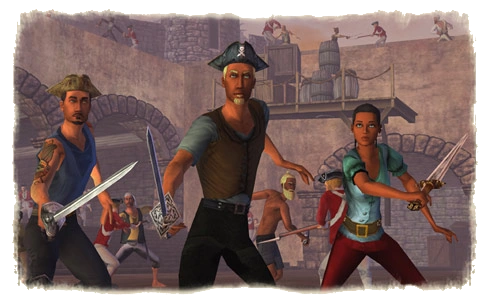
Did you know that being in a CREW gets you special bonuses? It's true! Whether you're fighting a sea battle or against enemies on land, being part of a crew is smart because you get a reputation bonus and it helps you level up faster. Plus, it's just more fun to fight the Undead with other Pirates. That's why we're bringing back...CREW DAYS!
Every Friday and Saturday evening, we encourage all Pirates to get down to the docks of Port Royal, Tortuga or Padres Del Fuego and CREW UP! If you're not asked, start one yourself! Then go pillage and plunder and watch how quickly you can rack up gold, reputation and other loot.
WHEN: 3:00PM to 8:00PM - Every Friday and Saturday, starting June 25
(All times Pacific Standard times/Los Angeles)
WHERE: Docks of Tortuga, Port Royal and Padres Del Fuego
During this event, please be respectful and helpful towards your fellow Pirates by sticking to the Pirates Code.